
Features
Everything Vaultin AI does today
An AI assistant for client work that runs on your Mac. Every feature below ships in the app now, on every plan, starting with the one that matters most: you see what is sent, before it is sent.
![Before sending: 3 passages will be sent with this message. Each passage shows its document and page, and the names replaced in it, such as Northgate Builders Ltd as [ORG_1] and Harbour Estates as [ORG_2], each with a Don’t replace button.](/assets/shots/review-panel-light-1160.webp)
01 · Chat
Write with real names. The AI never learns them.
Names are replaced before sending, one person to one placeholder however they are written: “Sarah”, “Ms Collins” and “S. Collins” all point to [PERSON_1]. Tone survives, so a letter to Ms Collins stays formal.
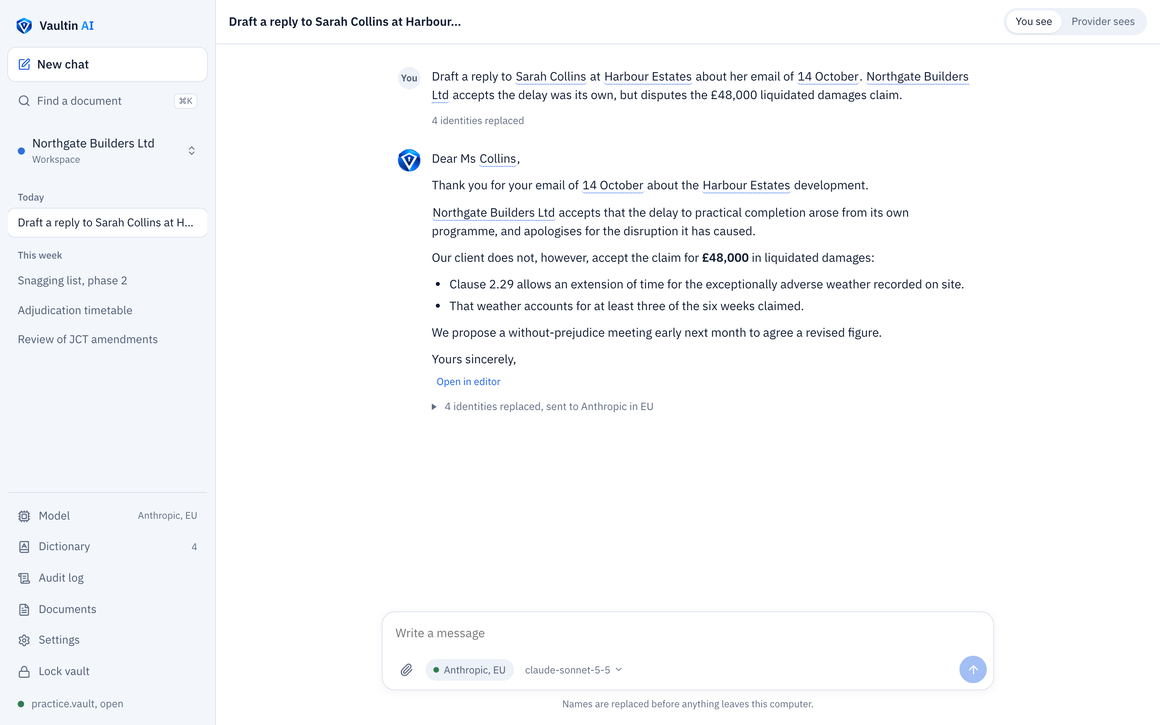
![The same conversation as the AI provider received it, with Sarah Collins, Harbour Estates and Northgate Builders Ltd replaced by placeholders such as [PERSON_1] and [ORG_2].](/assets/shots/provider-sees-light-1160.webp)
Marked as you type
Names are highlighted in the message box as you write, each shown with the placeholder it will become, and a count of what will be replaced.

Asks when unsure
If a name could belong to more than one person, Vaultin AI asks “Which Sarah?” before anything is sent. It never guesses.

Contract terms understood
“The Employer” and “the Contractor” are sent along with whose placeholder they stand for, so the AI can follow the contract. Short names a contract defines, such as “HFL”, are hidden too.
![A request in the audit log, as sent: Defined terms in these documents: in document 1, Employer is [ORG_2] and Contractor is [ORG_1].](/assets/shots/defined-terms-dark-1440.webp)
Your choice of AI
Claude, ChatGPT, Gemini or Mistral, or any OpenAI-compatible service such as Azure OpenAI, through your firm’s own account. Each shows where it runs and what it keeps.

02 · Documents
Ask a client’s files, and check every answer
Review before sending
Every passage and every replaced value, coloured by kind, before anything leaves. Choose “Don’t replace” for a value, or Redact any words.
More file types
PDFs, scanned ones too, read on your computer. Word, Excel, emails (.eml) and text. Tables are read row by row, each value beside its heading.
Search by meaning, offline
“Finishing late” finds the liquidated damages clause, though the two share no words. Nothing is sent, and it works offline.
Sources you can open
Each point in an answer names the document and page. Click it to open the PDF at that page, with the passage highlighted.

Passages or whole document
Pick documents for a message from a searchable list, then send only the relevant passages or the whole file.

Watched folders
Point a client workspace at its folder and new or changed files are picked up each time you unlock. Keep an encrypted copy in the vault, or leave the originals where they are.

From search to answer
Find a document by meaning, then “Ask in chat” takes the results into a conversation. Names are replaced before anything is sent, as always.
![The contract taken from search into a new chat. The question names Northgate Builders Ltd, which will be sent as [ORG_1].](/assets/shots/search-ask-dark-1560.webp)
03 · Outputs
From an answer to a file you can send
Save as Word or Excel
Headings, lists and tables come out properly in Word. In Excel each table gets its own sheet, with numbers as numbers. Files are written only where you choose.

Ask for a file
“Make me a spreadsheet of what Northgate has been paid” returns a file card with its table and a Save button.

Editor
Open an answer in the editor and change it before you save it, so the file says exactly what you mean.
04 · Control
Each client kept apart, every request on record
One workspace per client
Documents, chats and placeholders are kept apart for each client, and colour-coded, so work for one client never draws on another’s files.

Workspace profiles
Legal, Accounting and finance, HR and recruitment, or Custom. Each sets what the workspace hides, from names and companies to dates, addresses and reference numbers, and you can switch any kind on or off.

Provider rules
Limit a workspace to EU providers, or to a set list. Any other request is refused and logged, and so is any change that loosens protection.

Dictionary
See, search and correct every placeholder in a workspace. Mark two names “Not the same person”, and keep lists of words always or never to replace.

Encrypted vault
A passphrase opens it. It locks after 15 idle minutes, or the time you choose, and whenever the Mac sleeps.

Audit log
Every request exactly as it was sent, in a hash chain that is checked for tampering. Export it as PDF or JSON for a partner, a client or an auditor.

Your data is never held back
If a subscription ends, the vault opens read only. Every chat and document stays readable.
Coming laterWindowsAI models that run on your own computerFilling in your own templates
Every feature, on every plan
Try it free for 14 days on a Mac with an Apple chip.